About Me

- Amber
- The Apple State, United States
- Visit me at ambermcleod.com where I display my wares...
But I Don't HAVE an iPod!!!
 9:31 AM |
  Posted by
Amber
Posted by
Amber
That aside, when you open the glovebox in this lovely vehicle you find a little iPod connector. Cool, right? Well, insanely cool...if you have an iPod. I, however, do not have an iPod. I have a Droid. Before the Droid, I had a Blackberry. That's where I keep my music because I'm 36 years old and I feel I've surpassed the point in my life where having the latest fashion in tunes on their own special device is important.
The problem exists now though. I want to listen to the music on my Droid via my car speakers...but how? There's no little plug-in for any other input device. I've looked. I've tried to plug my Droid into random holes throughout the vehicle simply out of desperation.
Seeing my plight, my favorite friend finds this little gadget on Amazon:
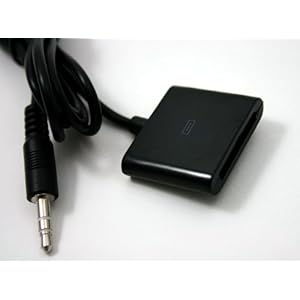 iPod Female to 3.5 mm Cable
Guess what? This gadget is no longer available. I hemmed & hawed too long, didn't want to pay the shipping because I'm cheap, and so it's not there anymore. And it seems as if this was the only thing of it's kind in existence??
I am a sucker for "As Seen on TV" gadgets. It's a weakness, and I know I'm not the only one because that's a thriving industry there. It's my favorite section in Walgreens. I've been eyeballing a particular gadget as of late but Walgreens was out. Fresh out! A couple days ago I visited Fred Meyer and saw they had a fresh batch. I bought one.

The sound quality could be better, but it's actually not bad at all. Again, I'm not cruising the streets in my pimped out ride looking for hot chicks...er...guys. I'm driving down the highway with my three screaming children trying to drown out the sounds they make. This will do the trick for me...for now.
Search Engine Shout Out: connect droid to car ipod , connect blackberry to car ipod, ipod blackberry droid adaptor, ipod 3.5m adaptor, Yukon iPod adaptor
 Labels:


Parsing php as htm on GoDaddy Hosting
I have files that contain php but I want to render them as htm. On GoDaddy (always the fun part -- cue eye roll). This is the line you need to add to your .htaccess file:
AddHandler x-httpd-php5 .php .htm .html
That's it! Hope it helps SOMEONE out there. Eesh...it took me long enough to figure the stupid thing!
iStock Weekly & Monthly Freebies
It's nice when you design for other people, to have a few extras - just in case. iStockPhoto offers weekly freebies. Some of them are really good images too, so be sure to check them out. You'll need an account to download.
This week:
Freebie Photo of the Week

Free Vectors of the Month


Registry Cleaner & More!
I found a really good gratis registry cleaner. It's very well written and was overall easy to use. You can remove all invalid entries, or you can pick and choose.
This program also cleans out any temporary files - not just internet files - but files from program backups as well. It will allow you to remove old programs from the uninstall list as well as your system startup entries (msconfig). Disabling an item from msconfig doesn't remove it, but this does.
Without further adieux....CCleaner. Have a look-see! http://www.ccleaner.com/
Free Help Desk & Knowledgebase Solution
If you have a business that could benefit from having a Help Desk and/or Knowledgbase, then have I found the software for YOU! I use it on my own site.
The solution.......HESK! Found at http://www.hesk.com/ - this software is written in PHP and runs from a standard MySQL database. Easy to install if you know your way around FTP.
This help desk allows you to build up a knowledgbase of FAQs, as well as the provision of a support ticket system. You're able to add users in your admin area should you need others to help you answer tickets; categorize tickets, browse, archive, the full deal.
This really is an excellent software. I've shopped around and this is a winner!
WAIT! What if you don't need the support ticket system? ANOTHER fabulous solution, and totally free....68KB - found here: http://68kb.com/download/ . I've also used 68KB and it does a great job with simple FAQ management.
Two great products, worth every penny!
What to do with the Big Flash?
I use Corel R.A.V.E. to create my flash files. It's not my specialty, but I know enough to get the job done. The problem I have is that the files I create are just absolutely MASSIVE. I'm all about gratis software to solve most problems, but this particular problem did not possess a freebie fix.
I tried the demo versions of several SWF Optimizers, and the one that I actually liked the most ended up being the least expensive. Sparkle SWF Optimizer comes affordable at $24.95 and this program really shaves the size down, up to 70%!

Rave: Quick Text T-Bird Add-On
 Everyone who is anyone has heard of Mozilla, specifically Firefox the alternate (and swiftly popular) browser. Mozilla of course offers a gratis email client, Thunderbird. I have been using Thunderbird for years. It has crashed a few times, but overall a great experience. And I LOVE having software that I can install add-ons and tweaks, Thunderbird is open source so the possibilities are endless.
Thunderbird has several add-ons, a few I've used. Some I love, some are awful. But THIS one is fantabulous.
Often I have to send instructions to people on how to do something. And I have to send these instructions to different people at different times. So instead of typing them up each time, initially I had them saved in my knowledgebase and would either send people there, or copy & paste.
Thunderbird has solved my inconvenience problem! The add-on is called Quick Text and it allows you to create categories, then add blocks of text in either TEXT or HTML format. It adds a toolbar to the new email window, and makes adding text as easy as one click.
The mod was created by user WizKid and can be found here:
https://addons.mozilla.org/en-US/thunderbird/addon/640
Cheap or Free Royalty Free Clipart - No Credit Required?

Someone today asked, in a group setting, the best place to get graphics that don't require credits. I offered up my suggestion - iStockPhoto - that's where I get a lot of my royalty-free images that don't require credits.
The response of this person was that iStockPhoto was too expensive. I understand people are on a budget, I really do. We have ALL been there. And of course I left it at that, I'm not going to argue with someone over how much they want to spend somewhere else. No point.
I have dabbled in graphic design - I'm okay at it, but it's not my strong point. Because of my dabbling I know that graphic design isn't a talent that is just put into play at the mere suggestion. There is planning involved, there are layers that must be matched & placed accordingly - what may seem like a very simple graphic can take the artist hours to complete. That doesn't even take into account the artist creating the CONCEPT for the design. If you're so lucky to find quality graphics for FREE, excellent, but why would you want to deny the artist the credit, when you paid nothing for their skill and talent?
Because I utilize royalty art on a regular basis, I try to be very careful about reading the terms of use. It's important! If you misuse someone's idea, you could find yourself in a pickle. :) So before you buy, read the TOU and purchase the proper license. It may cost you upwards of $20 for a commercial license for a high quality vector (resizeble/recolor-able) image. But take into account that these graphics are the artists INCOME.
iStockPhoto, StockXpert, MyGrafico and Dreamstime are just a few sites that offer excellent graphics with commercial or standard licensing options. Standard licensing generally requires that you give credit to the artist, but it's not always the case. You just have to read the terms.
So...that's my rant for the day. Not the most interesting topic, but one I feel strongly about.
Moving Email from an Old Server to a New Server

- Start > Run > "explorer" > Enter
- Type your ftp:// thing (above) into the address bar > Enter
- Right click on the screen & "Login As"
- Enter your cPanel username/password, or you can use your FTP (probably the same), just be sure you have full permissions to the root directory.
Once you're in, click MAIL
Click the email address you want to restore.
Your current email will be stored in the folder called "cur", but you can COPY any of the folders in there. So do that - highlight > copy.
Save to your hard drive somewhere - desktop, zip, I don't care. Just paste it somewhere. Don't try to get fancy and put it on a CD or DVD. Just KISS....put it on your hard drive. It will take a LONG TIME to download. The more email you have, the longer it takes.
Upload these files to your new host in the MAIL directory that resides in the ROOT directory. This should restore your emails. You can do the upload via FTP client, it was the downloading that wasn't happenin' in the FTP client. I use FileZilla.
If you have no idea what I just typed up there, then maybe this isn't a good project for you. Or you can send me $50 to type out the instructions in layman's terms. :D
I only transferred the "cur" folder, I didn't try any others but I can't imagine it wuuld be any different.
You MUST have a normal host to do this. I'm betting it won't work on a big reseller host like GoDaddy because they like to restrict your access. Pppplllllltttt on them.
Mozy Gets the Score!
Telling it like it is really. Short post. Carbonite doesn't support external hard drives. Mozy does. Google for Mozy promo codes and get 20% off of a one year subscription. ($45ish total).
With all the hype about Carbonite, and all of the celebrity (paid) endorsements you'd think they'd be top of the game...but no go. So Mozy has my business.
Oh HD....wherefore art thou?
I bought a WD External Hard drive from Overstock - refurbished, but I'm frugal. My husband calls me cheap. Toe-MAE-toes....toe-MAW-toes.
I put EVERYTHING on this drive, all working files, graphics, you name it. I've been meaning to buy offsite backup for it, but haven't had a lot of luck finding something that supports external HDs. (see next post)
Yesterday I plug everything in, and my I:/ drive is just gone. When I plug it in, my system (Vista...of course) won't recognize it, it has no drivers, there are no drivers to be downloaded to make it work. I'm stuck. So I Google.
I went through several different troubleshootings posts along with their owners, and they all said the same thing. I don't like digging through what didn't work for others, instead I just post what did work for me.
Check the plug. Check the cable. Light coming on? Sounds normal? If that's the case, try this:
- Control Panel
- Administrative Tools
- Computer Mgmt
- Disk Mgmt
See your hard drive there? If not...sorry, not your solution. If yes (you may see it twice - ignore that for now)...then YAY!
Right click & explore. Then go check out your "My Computer" to see if it's there.
That did it for me!
Dear Pearl, What do you mean, "Unable to reconnect to the device during a multi-stage load operation" ??
My husband got a new Blackberry and his software was better than mine. So I decided to upgrade my software from the BB site in a feelbe attempt to keep up with the Jones' (or my husband). I've never done this before, I've never really cared because I'm not one of those "must have my cell phone at all times" people -- in fact, I often lose it. But surely his can't be better than mine!
So I installed the desktop manager and plugged it in. (Go to your service provider to download the desktop manager for your BB) I have a Compaq Presario laptop, Windows Vista. Got everything up & rolling and it gets to the end of the installation and I get this error:
"Unable to reconnect to the device during a multi-stage load operation" -- and when I boot up the phone it gives me error #507 - in the language of Blackberry Pearl, that means there's no software installed.
So that was really nice. My $300 phone just became a child's toy. But like I tell my kids, we do not give up! :) Sometimes I do, but I don't tell them that. They can discover their parents are hypocrites in a few more years.
Anyway, I'm going through these BB forums only to learn that I'm up a creek minus paddle. I hardly think so.
So....if anyone else gets this error, I'll tell you what I did to fix it. And surely this won't work for everyone, but it will work for 24% of you. Give or take...
Before you begin, I pop the battery out of the Blackberry (that's not the fix, that's just part of what yo have to do). After that, I initiate the software on my PC. When it tries to find my Blackberry on a USB port, I notice that it doesn't recognize it. So, I unplug the USB cable and plug it back in. It recognizes it. Push button...commence.
After the software starts doing it's backup and load sequence, I put the battery back in. THIS was the key. For some reason the USB cable just wasn't providing enough juice to keep the Blackberry going.
Also, be sure your power options aren't set to turn off your USB ports. Probably not the problem but worth checking. Device Manager > USB Ports > Power Mgmt...you'll see the option.
Update Successful! So that did the trick, hopefully it helps someone else.
Low-Cost Marketing Secrets
"One of largest expenses of runningyour business is promotion and advertising, especially for a new or small business. Making your business known in a community at he lowest possible cost can be tricky and time consuming."
"However, there are many ways a business can do this. A pet breeder in a large city was struggling for several years-until he came up with a novel idea. He started giving away customized “birth certificates” for the pets he sold. Almost immediately, his sales rose more than 10 percent. Now you even see specialty stuffed animal stores offering “birth certificates” with the purchase of a lovable critter!"
"The owner of a new home cleaning service was trying to attract clients. She couldn’t afford much advertising, so she began offering “home cleaning seminars” to civic groups. After two months of seminars, she was swamped with inquiries and..... "[read more from Jennifer Edwards]
Charging Hourly? Getting interrupted by kids? Yup...I know.
At first I tried using a Wiki to keep track of minutes. No go.
Then I tried Project Pier. AWESOME program, I'll use it for big projects - not minute tracking.
I had to slowly extract myself from cyberland and head back to my roots. Pen and paper. Yeah, you heard me right. Pen. Paper.
In the sixth grade I won the penmanship award. Here's some trivia...in what year did they stop giving penmanship awards? 1985.
Needless to say, my fingers are so accustomed to my precious QWERTY that a pen feels foreign and my writing is nothing short of pathetic. Sometimes I forget how to finish off a letter and so I just draw a line. That must be what doctor's do - only they do it out of sheer lack of time whereas I do it out of sheer lack of neurological function.
Again I digress. If you charge by the hour and you have kids bothering you every four to six minutes, make a time log. I have 7 columns on mine:
- Date
- Client/Job
- Start Time
- End Time
- Charge
- Billed
- Paid
10:42 10:45
10:48: 10:57
...and so on. I always round up to the next minute on start times because that seems fair. Overall I do this because I'm fair, I couldn't stand it if someone thought I bilked them out of 14 cents.
ANYWAY, print a stack of these time log sheets on a clipboard. If you have several clients who you do small jobs for, give them their own sheet. I am NOT the queen of organization, I generally have tons of great ideas, very few do I implent. But this one? It has helped me immensely.
If you don't want to make your own, just download mine. You'll need Adobe Acrobat Reader, but seriously, who doesn't have that??
Here's the link: http://www.affordable-site-design.com/downloads/time-log-sheets.pdf
Do your worst!
Free Marketing eZine
Visit Seymour Products and sign up for their free Business marketing Bulletin Newsletter. They offer a lot of great tips, and some are new and ingenious which is what we love!
I'm no marketing guru...
Get Your Movies for Nothin', and Your Books for Free!

Oookay, you might notice the banners slathered all over my screen here. I just simply adore these three sites:
- Paperback Swap -Nope, not just paperbacks. You can list the books you no longer need on this site. When a member wants one of your books, you send it to them. When they receive your book, you receive a point. You can then use that point to request a book from another member. The cost to you is shipping! True, some books cost more to send...but it's cheaper than buying a new book any day!
- Swap-a-CD - Okay, same premise as the book swap, but with CDs. I have picked up some CDs for my kids -- you know how kids ruin things? This is such a great way to get kids' music! There is a small fee to required for each swap (49¢), plus 1 point. But again, cheaper than buying a new disk that will most likely land in the toilet or toaster at some point!
- Swap-a-DVD -Again...the same premise as the above but the swaps don't cost any cash. Some DVDs will cost 1 point, some will cost 2. One DVD point is equal to two book or CD points...

...bringing me to my next "point" (hee hee)...the points are transferable!! So, say you have a gazillion books to post, but really not many DVDs. No problem! Post them, send them, and transfer your points to the DVD site.
One thing I've noticed is that the CD site is slow. I have a ton of CDs posted and only have had one requested. Okay, probably because my music is lame. Yeah...I'm actually sure that's the problem. BUT I've had nearly all of the books I posted sent out, and I've gotten some DVDs that, again, replenished the kids' movies that they have destroyed.
I highly recommend these services. The people are friendly, the swaps have all been a breeze, and it's just a total win-win situation.
Technology at it simplest doesn't get any better than this!
ICK on toolbars...except this one!
So I don't hate toolbars THAT much, but I do refuse to install them, with the exception of Google and my latest....FOX News Talk.
"I hate politics!" -- "I hate talk radio!" (Does that sound like YOU?)
I don't, and I'll tell you why. You can skip over this next bit if you don't care...but if you don't care I'm not sure why you got this far. Anyhoo...I like talk radio, specifically FOX because I get to hear both sides of the debates, stories, etc. After all, their tagline is "Fair and Balanced." and they really truly are.
While I won't divulge my political party (whatever that means) right here because it doesn't matter in a nation of electoral votes - though I DO cast my vote each and every time! - I will bring to your attention the FOX News Talk toolbar. I love that I can just "click" and listen to the news while I'm online, which is A LOT.
I think it's all just interesting. I love listening to both sides, and flies on the wall will hear me say "huh" (thoughtfully) or yell, "Yeah RIGHT you idiot!"...things like that. Sort of like my husband yelling at the TV during a game, I'm right here during Hannity & Colmes nodding and shunning to my computer screen. It's a great time.
My point, in a nutshell: Everyone should be up on their current affairs. FOX news is entertaining and enlightening. They have a toolbar which makes listening easy. Click HERE to get it.
Something for the worried moms...
The Giggle Bug Child Locator. Those of you who have kids, which is many of you, you know we all share one same fear. LOSING one. At least the young ones...the older ones not so much, at least for a little while. What do I know, I don't have teenagers yet.

This device comes in three colors. It's CUTE (which you know I LOVE) and this is how it works. The child wears the receiver (clip it on) and the parent keeps the locater beeper thingy. If you need to know where your child ran off to, simply press the button for a quick "beep beep" and you're all set!
Like Laura and I always say, you cannot put a price on your children or your peace of mind. Well, we don't say that...but we should!
BUT our original slogan says it all: Protect your children, there's NO excuse!
Now don't you feel compelled? Go buy one...$29.95/ea. Can't beat that!
Speaking of penguins...
Regardless, I want to share this program that my kids just love. My 3yo loves it, my 6yo loves it. If they can use a mouse, they'll be mesmerized with Tux Paint.
An open source project, this program is like MS Paint on....umm...an energy inducing drug of some sort. A colorful one with sound effects.
You can download the software free at SourceForge, and don't forget to download the fonts and stamp sets. Read the directions to make sure you do it all correctly.
One technical note -- install it on a computer you don't use. Why? Because you won't be able to peel your children away from it.
This one is fun, educational and time-consuming. If you need a little peace and quiet, here's your baby sitter. (No, DON'T leave the house!!)
And your link for download: http://tuxpaint.sourceforge.net/
Have fun!!

